
From Spreadsheets to Source of Truth: Automated Sales Commission Management
Calculate, record, and pay sales commissions natively inside Microsoft Dynamics 365 Business Central. Replace error-prone spreadsheets with an audit-ready commission ledger that updates the moment a sale posts.
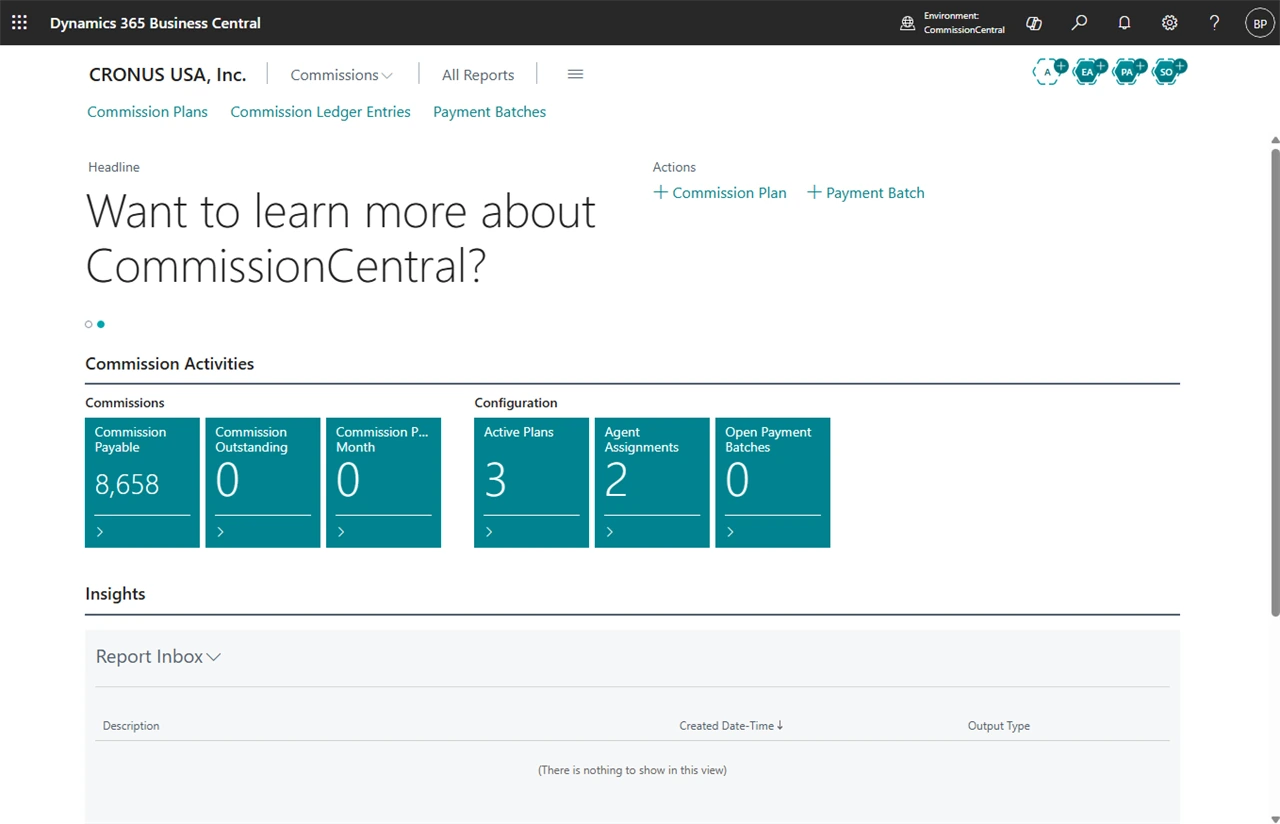
Win Back the Days You Lose to Manual Commission Work Each Month
Finance teams spend 10–20 hours a month wrestling with commission spreadsheets — and still find rate errors after payment, miss credit-memo reversals, and carry invisible liability until funds move. CommissionCentral helps eliminate these risks with a real-time ledger that does the math for you.
Fully embedded in Dynamics 365 Business Central, CommissionCentral auto-creates a commission entry on sales posting, supports flexible multi-variable rate plans and multi-agent splits, and pays agents through A/P or payroll, giving the visibility they need while removing manual calculation.
Commission Management, Reimagined.
CommissionCentral isn’t just a calculator — it’s a complete commission system built for companies that pay sales reps, channel partners, and managers on what they sell. Whether you pay internal employees through payroll, external vendors through accounts payable, or both, CommissionCentral gives you full control over rate plans, splits, approvals, and payouts inside one unified platform. Key capabilities include:
Flexible, Multi-Variable Commission Plans
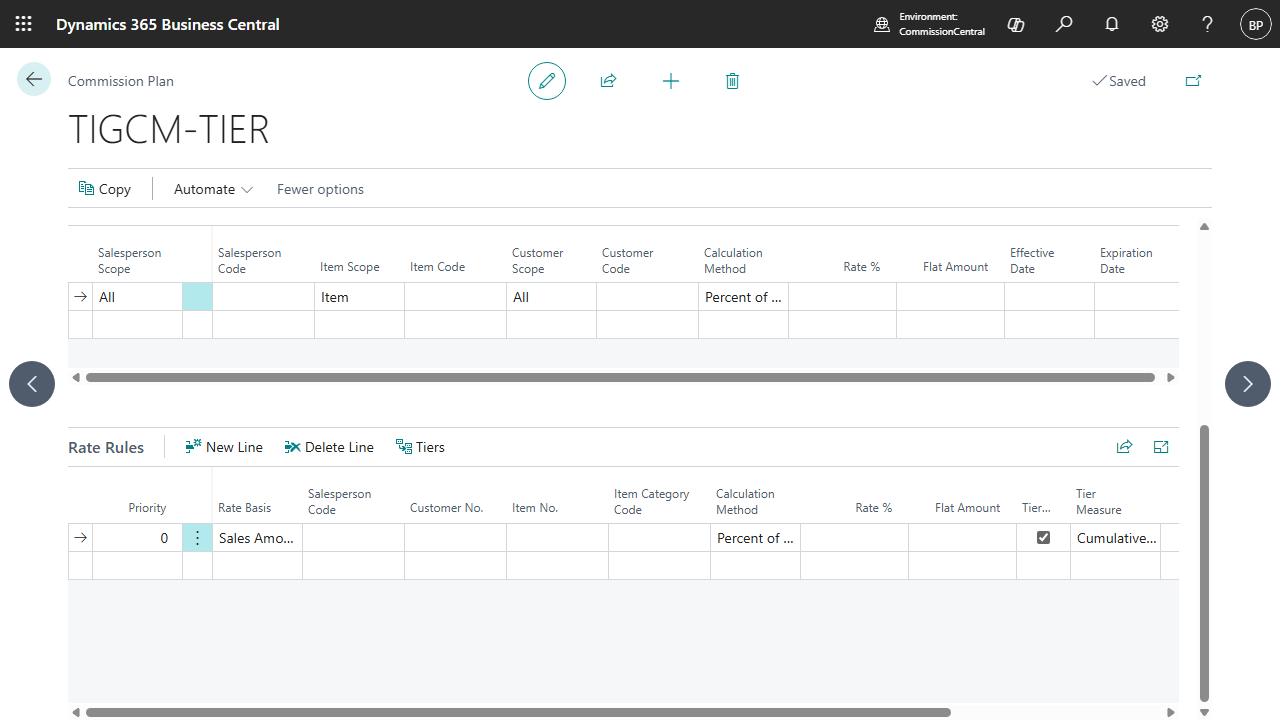
Support many compensation scenario across your reps, products, and customers. CommissionCentral’s Plan Builder lets you express simple flat rates or sophisticated multi-variable plans, then resolves the correct rate for sales automatically — so the rate that earns is always the rate you intended.
- Build multiple date-scoped commission plans, each with its own ordered rate rules.
- Set rates with a point-and-click rate matrix across salesperson, item, and customer scope.
- Apply tiered, waterfall rates so each portion of a sale is paid at its own breakpoint rate.
- Filter rules by salesperson, customer, price group, item, item category, and dimensions.
- Resolve the right rate automatically with priority-ordered, first-match logic — no hard-coded rules.
Automated Commission Calculations & Tracking
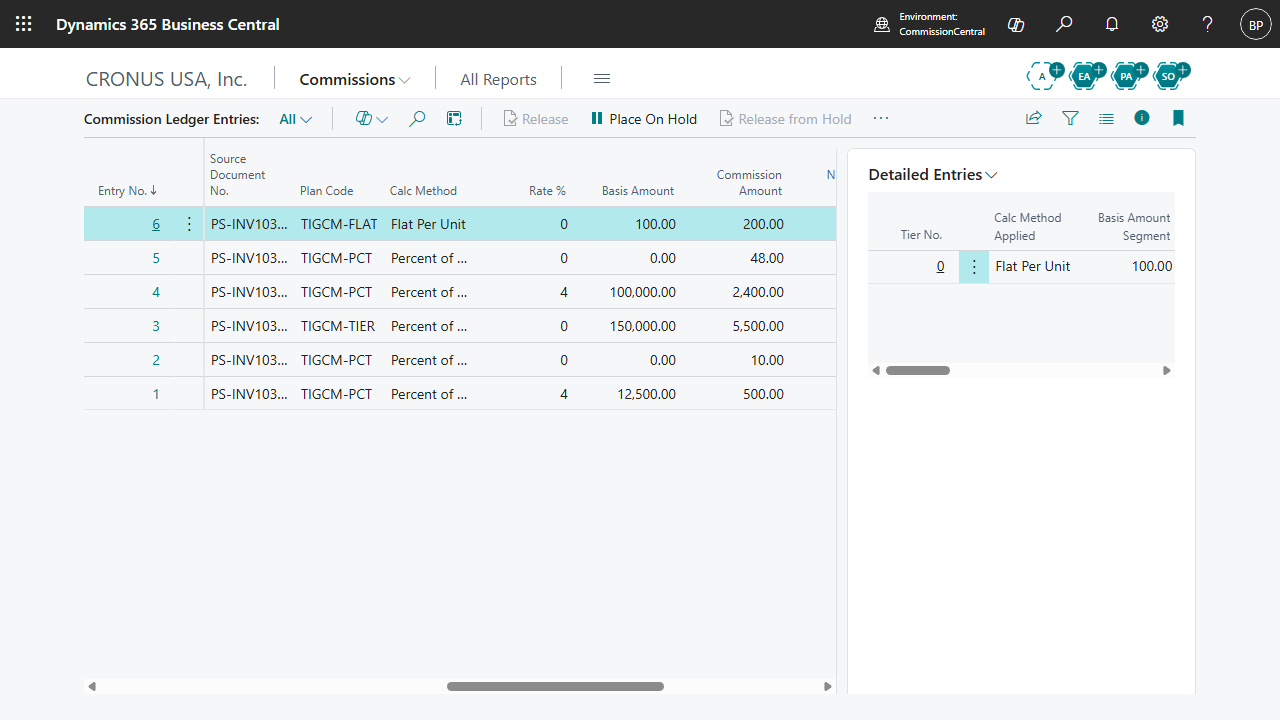
Stop reconciling totals by hand. The moment a sales document posts, CommissionCentral calculates commission for commissionable lines and active agents, captures the full calculation detail, and writes it to the ledger — accurately and automatically, each time.
- Auto-calculate and record commission on sales postings — no user action required.
- Choose when commission is recognized: on posting, on payment collected, or on shipment.
- Calculate by percent of sales, percent of margin, or a flat amount per unit.
- Preview commission on any sales document before it posts, with zero side effects.
- Flag individual lines as non-commissionable or apply a manual rate override per line.
Multi-Agent Splits & Manager Hierarchies
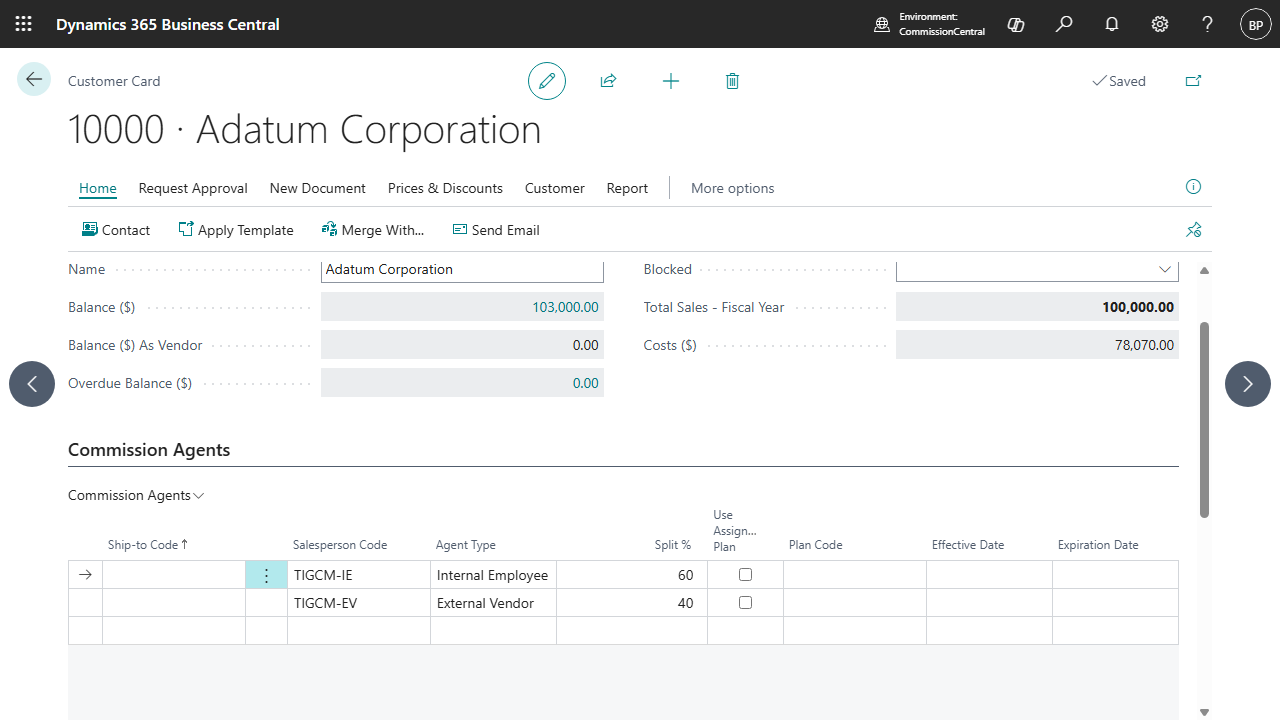
Real sales teams rarely fit a single-rep-per-customer model. CommissionCentral removes Business Central’s native one-salesperson limit, letting you split sales across reps, auto-assign agents by territory or product, and reward managers on team performance — all with rates and splits that compose cleanly.
- Assign multiple agents per customer — and per ship-to address — with configurable split percentages.
- Validate that each customer's active splits total exactly 100% on entry.
- Auto-assign agents to new customers with attribute-based commission networks.
- Pay managers a percentage of their team's earned commission as separate ledger entries.
- Fall back to the document salesperson at 100% when a customer has no assignment.
Smarter, Faster Commission Payments
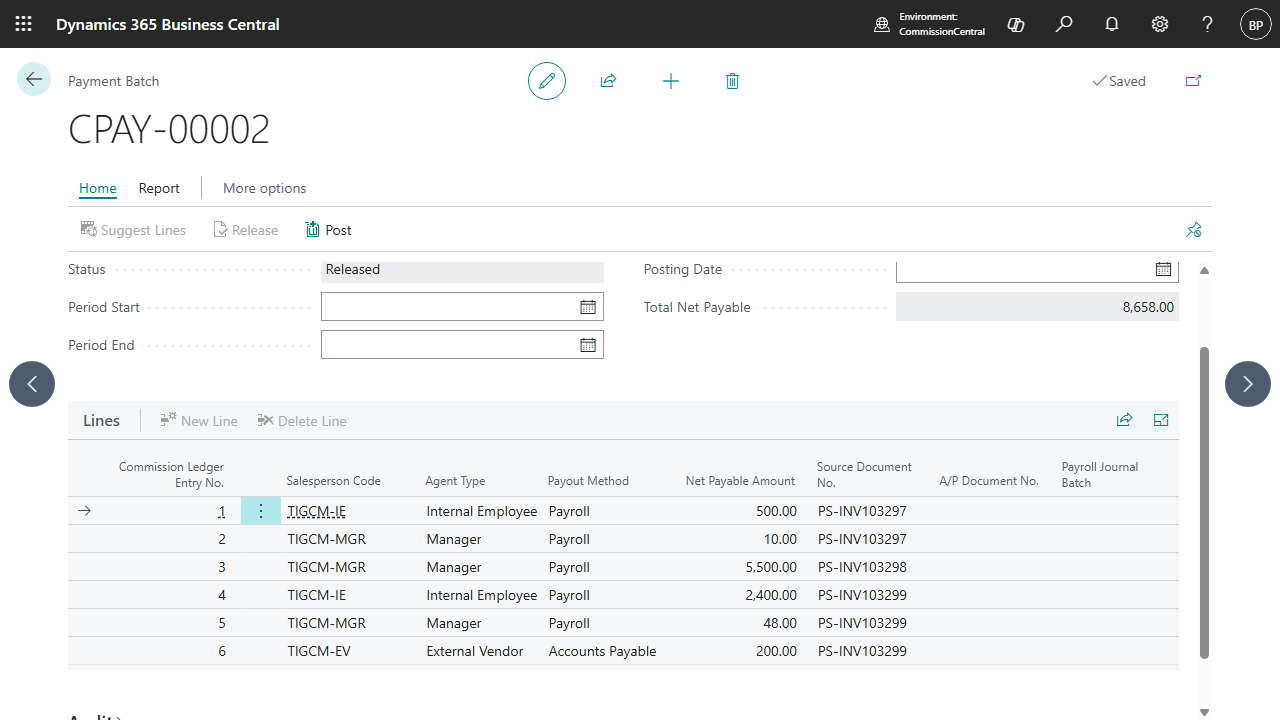
Move from calculation to cash without leaving Business Central. CommissionCentral assembles payable commissions into batches and routes each agent the right way — a purchase invoice for vendors, a payroll journal line for employees — while caps and draws are applied in a fixed, predictable order on each payout.
- Build payment batches that gather payable commissions by period and agent.
- Generate A/P purchase invoices for external vendor agents automatically.
- Create payroll journal lines for internal employees, matched to net payable.
- Manage draws and advances that net against future earnings automatically.
- Enforce period caps, then net draws, with net payable always floored at zero.
Real-Time Reporting & Manager Dashboards
Each number traces back to a source. Because the commission ledger is the single source of truth for all reporting, managers and finance see live totals they can trust — and can drill from any figure straight to the entry and the document that produced it.
- Give managers a dashboard of team totals — outstanding, payable, and paid — with drill-down.
- Run summary reports that aggregate commission per salesperson with status breakdowns.
- Run detailed reports showing rate, method, tier, and gross profit for each entry.
- Compare actual earned against target with amount and percentage variance.
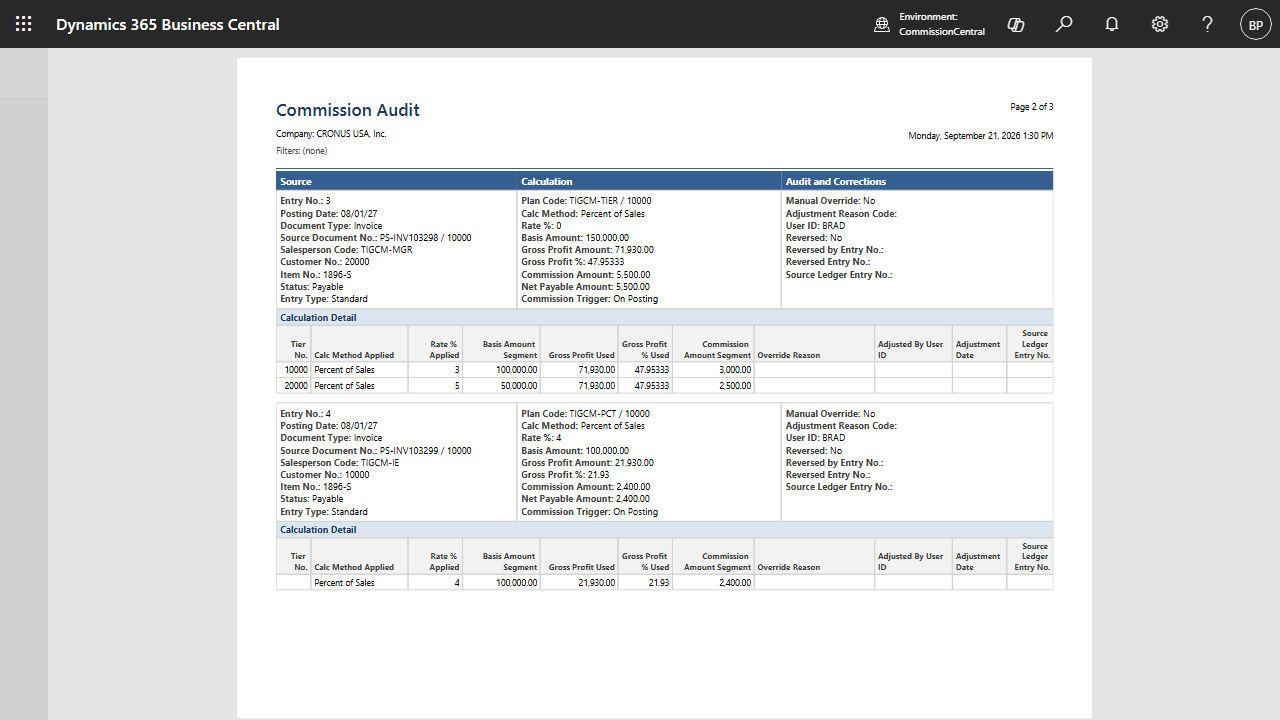
- Produce an audit-trail report spanning reversals, adjustments, and overrides.
Audit-Ready Ledger & Compliance Controls
Be ready for audit by default. Commissions are created only through a single, controlled posting path, and the ledger is append-only — so each amount can be fully explained from stored data, and disputes are settled by looking at the record instead of re-running a spreadsheet.
- Record each commission event in a single source-of-truth commission ledger.
- Trace each entry to its source document, rule, method, rate, basis, and posting user.
- Reverse commissions automatically when a credit memo posts — with offsetting entries.
- Keep an append-only history: adjustments and reversals never overwrite the original.
- Place entries on hold, release them, and gate payouts behind an approval mode.
One Platform for Sales, Finance, and Commissions
Ditch the spreadsheets and disconnected systems. CommissionCentral brings rate plans, calculations, approvals, payouts, and audit together inside the Microsoft cloud ERP your team already runs on.
- Operates natively inside Microsoft Dynamics 365 Business Central.
- Reads sales, customers, items, and vendors with no external data syncs.
- No middleware, connectors, or separate commission database to maintain.
- A cloud-safe, upgrade-safe extension that survives Microsoft platform updates.
Start Automating Commissions and Eliminating Errors Today
See how you can calculate, approve, and pay commissions — accurately, transparently, and in real time — all inside Business Central.
Book a DemoCommissionCentral FAQs
Your most pressing questions about our commission management software, answered.
What makes CommissionCentral different from other commission tools?
Most commission tools sit outside your ERP and require integrations, exports, or manual reconciliation. CommissionCentral is different — it’s fully embedded in Microsoft Dynamics 365 Business Central. Your commission calculations, approvals, payouts, accounting, and audit trail all happen in one centralized system, so the numbers are faster, more accurate, and far less prone to the errors that come with disconnected spreadsheets.
Can CommissionCentral pay both internal employees and external sales reps?
Yes. Each agent is typed as an internal employee, an external vendor, or a manager. When you post a payment batch, external vendor agents receive an A/P purchase invoice to their vendor, while internal employees get general journal lines for payroll using the commission expense account. A single batch run can process each agent at once and produce the right document for each.
Are commissions calculated as a percentage or a fixed amount?
Either. CommissionCentral supports percent of sales, percent of margin (the rate applied to gross profit), and a flat amount per unit. You can mix methods across plans and rules, and tiered waterfall rates let each portion of a sale be paid at its own breakpoint rate rather than applying one rate to the whole amount.
Can a single sale be split across multiple reps?
Yes. You can assign multiple agents to a customer — and to a specific ship-to address — each with their own split percentage. The system validates that active splits total exactly 100%. Each agent’s rate comes from the plan or rate matrix, and the rate composes with the split, so a sale can be shared and rated independently per rep.
When is commission recognized — at invoice, payment, or shipment?
You choose. CommissionCentral supports three trigger modes: On Posting (recognized when the invoice posts), On Payment (recognized as the invoice is collected, once a configurable cash-collected threshold is met), and On Shipment (recognized when the shipment posts, with a true-up adjustment if the later invoice differs). The trigger can be set globally and overridden per plan.
What happens to commission when a sale is returned or credited?
When a credit memo posts against an invoice, CommissionCentral automatically locates the related commission entries and posts offsetting negative entries, marking the originals as reversed with a cross-reference between the two. If the original commission was already paid, the reversal is still recorded and the entry is flagged for manual finance reconciliation, since the payment already went out.
Does CommissionCentral handle draws, advances, and caps?
Yes. Finance can create a draw or advance that increases an agent’s draw balance and nets against future earnings. You can also set period caps, both global and per plan. When both apply, the cap is applied first, then the draw is netted against the capped amount, and net payable is always floored at zero so it never goes negative.
Can managers earn commission on their team's sales?
Yes. You can define manager teams where a manager earns a configured percentage of a team member’s earned commission. Manager commissions are recorded as separate ledger entries against the manager. Manager entries don’t trigger further manager lookups, so a manager-of-a-manager doesn’t earn on a team member’s sale.
How does the approval process work before commissions are paid?
Promotion of eligible commissions to payable is configurable. In Automatic mode, eligible entries become payable with no manual step. In Review mode, entries wait until a finance or manager release promotes them, with the releaser and timestamp recorded in the audit detail. Only payable entries are eligible for payment batches.
Does CommissionCentral include an audit trail?
Absolutely. Each commission event produces a Commission Ledger Entry — the single source of truth for all reporting, payment, and audit. Each entry records its source document, matched rule, method, rate, basis, gross profit, and posting user, with a detailed per-segment breakdown. Adjustments and reversals are append-only, so original amounts are always preserved and each entry can be fully reconstructed and explained.
Can I preview a commission before a document posts?
Yes. A Preview Commission action on sales documents runs the exact same calculation path as live posting but writes nothing — no permanent records and no commit. The preview results match what will post, so reps and finance can confirm the outcome before anything is recorded.
Does CommissionCentral work with Microsoft Dynamics 365 Business Central?
Yes, and that’s one of the biggest advantages. CommissionCentral is built as a cloud-safe, upgrade-safe extension for Business Central SaaS — it adds no modifications to the base application, so it survives Microsoft platform updates. Your commissions, financials, and sales documents all live in one place, with no external apps, middleware, or data syncs.
Is CommissionCentral available on Microsoft AppSource?
CommissionCentral is built to AppSource certification standards as a cloud extension for Business Central. Reach out for a demo or trial and we’ll guide you to the right way to install it in your environment.
Do you offer a free trial of CommissionCentral?
Yes. If you already use Dynamics 365 Business Central, you can try CommissionCentral in your sandbox. If you don’t yet have Business Central, we can give you guided access to a demo environment so you can evaluate the features and see how they fit your commission process.