
Licensing
CommissionCentral is licensed for each tenant. A built-in trial lets you evaluate the app before you enter a key.
The trial
After the first installation, the app runs in a time-limited trial. The app’s functions are available during the trial. You can configure plans, assign agents, and post commissions end to end.
Enter your license key
- Open the Commission Setup card.
- In License Key, paste the key that BCAppCo supplied. The app masks the value after it is stored.
- Choose Check License Key to validate the key.
The Check License Key action contacts the licensing service. It shows whether the stored key is valid. The app caches the result and checks it again periodically. Routine posting does not contact the service on each transaction.
If the license lapses
Commission processing needs a valid license. CommissionCentral fails safe, so a license problem does not block or roll back your sales posting.
If the app stops creating commissions unexpectedly, examine the license status on the setup card first.
Where to get a key
BCAppCo supplies the license keys, the privacy statement, and the terms:
- Product site: https://commissioncentral.app/
- Privacy: https://bcappco.com/privacy-policy/
- Terms / EULA: https://bcappco.com/software-end-user-license-agreement/
- Contact / support: https://commissioncentral.app/contact/
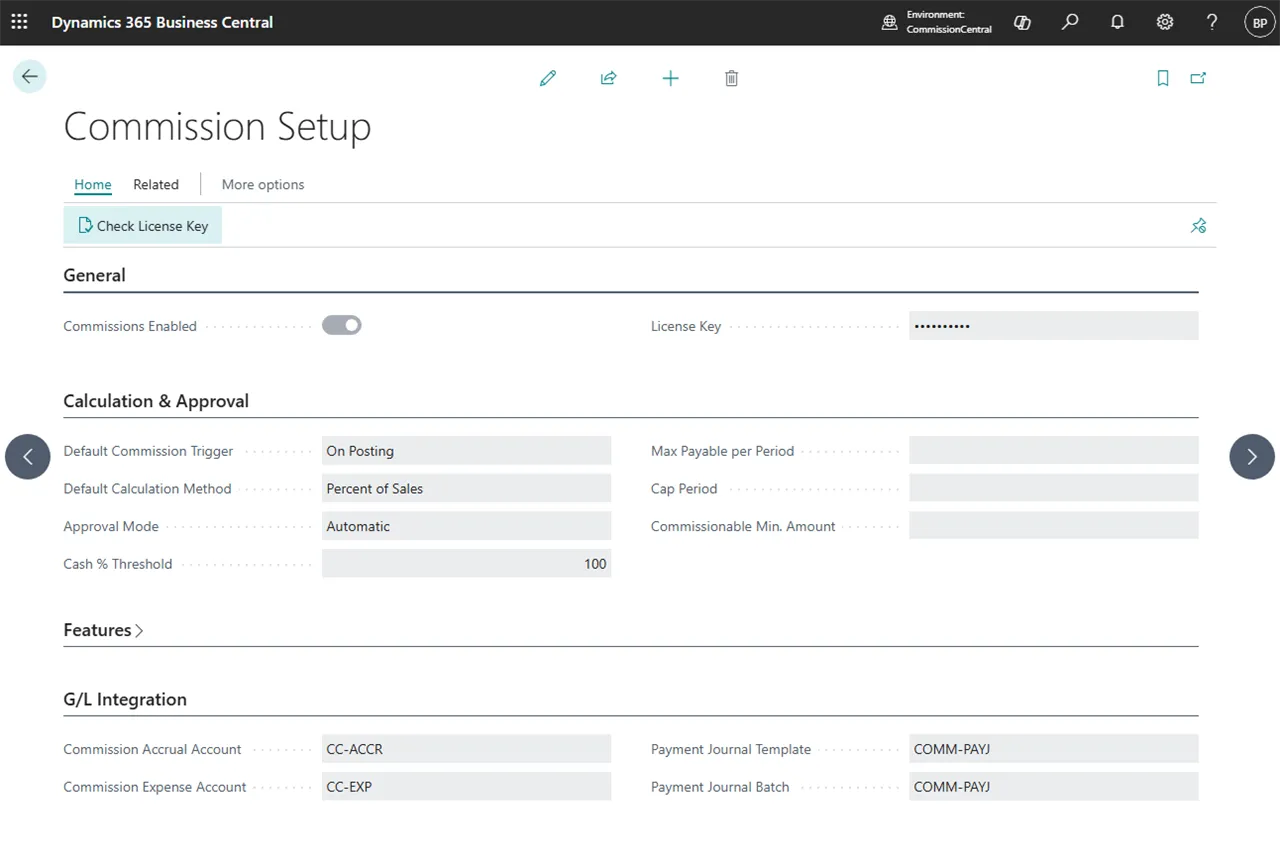 Figure: how to enter and validate the license key.