
Agents & splits
An agent is a salesperson who earns commission. CommissionCentral finds the agents for a sale from the agent assignments on the customer. Optional network auto-assignment and manager-hierarchy team commissions extend this.
The salesperson as an agent
Open a Salesperson/Purchaser card. The Commission FastTab adds:
| Group | Field | Purpose |
|---|---|---|
| Agent Type | Internal Employee, External Vendor, or Manager. The type controls how the app pays the agent. | |
| Default Commission Plan | The app uses this plan when an assignment does not select one. | |
| Payment Routing | Commission Vendor No. | The vendor for the Accounts Payable payout (external vendors). |
| Payment Routing | Commission Employee No. | The employee for the payroll payout (internal employees). |
| Targets | Commission Target / Target Period | An optional performance target. |
| Balances | Draw Balance (read-only) | The outstanding draw that future earnings net against. |
| Balances | Outstanding / Payable / Paid Commission YTD (read-only) | Live totals from the ledger. |
Agent assignments (per customer)
On the Customer Card, use the Commission Agents subpage to assign one or more agents to that customer:
| Field | Purpose |
|---|---|
| Ship-to Code | Blank applies to the whole customer. A value applies to that ship-to only. A ship-to assignment overrides the customer-wide one. |
| Salesperson Code | The agent. |
| Agent Type | The payee type for this assignment. |
| Split % | This agent’s share of the line commission. |
| Use Assignment Plan / Plan Code | Optional: pin a specific plan for this assignment. |
| Effective Date / Expiration Date | The assignment applies only to documents posted while it is active. |
Splits must total 100%. The active assignments for one customer/ship-to scope must add up to exactly 100%. A single agent defaults to 100%. Each agent’s rate still comes from the plan or matrix. The split only divides the line commission (rate × split).
No assignment → document salesperson. With no active assignment, the commission goes to the sales document’s Salesperson Code at 100%. With no salesperson either, no agent earns commission, and the app logs a warning.
Date scoping (no retroactive recalculation). The app evaluates assignments at the document’s posting date. A change to an assignment does not recalculate posted commission.
Networks (automatic assignment)
When Networks Enabled is on, a Commission Network assigns agents to a new customer whose attributes match the network.
- Commission Networks list/card — define the match attributes (Territory Code, Customer Price Group, global dimensions). In Network Assignments, define the agents and splits (these also total 100%).
- When you create a customer, the app copies the most specific matching network’s assignments onto the customer. (Re-evaluation when a customer’s attributes change later is a future enhancement.)
Manager teams (hierarchy commission)
When Manager Hierarchy Enabled is on, a Manager Team gives a manager commission on top of a member’s earnings.
- Manager Teams list — Manager Code, Member Code, Manager Commission %, and validity dates.
- When a member earns commission, the app creates a separate manager-type entry for the manager (the member’s commission × the manager %). Manager chains are not recursive. A manager cannot manage themselves.
Worked example (UC-08). A manager at 2% over a rep who earns $500 gets a separate $10 manager entry.
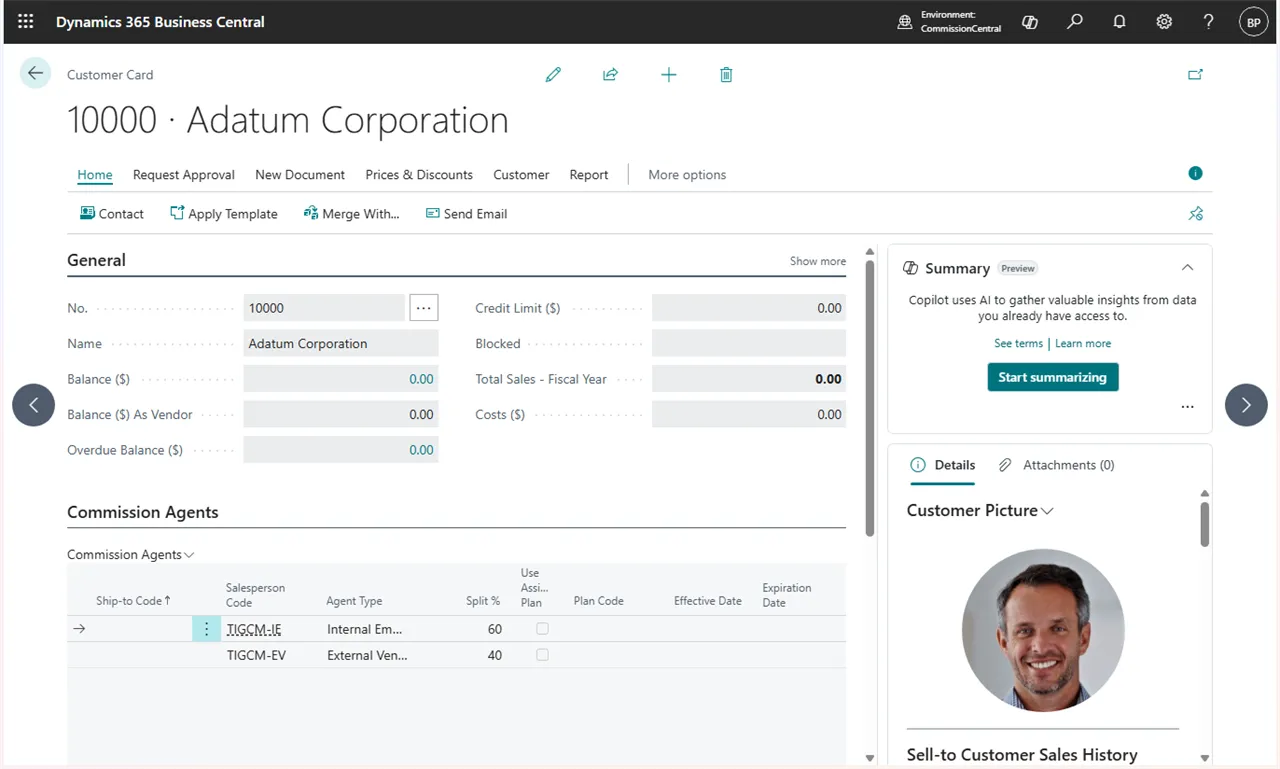 Figure: agent assignments on the Customer Card.