
Commission plans
A commission plan defines how much commission a sale earns. Each plan holds rate rules in priority order. A rule can hold a single rate or a tiered band set, or the rate matrix can generate it. Plans are date-scoped, and their number is unlimited.
Open search → Commission Plans for the list, or open the Commission Plan card.
How rate rules and the rate matrix relate
The engine resolves only against rate rules. The rate matrix does not feed the engine directly. The rate matrix is an authoring shortcut that generates rate rules: you fill in rows by scope and choose Generate Rate Rule. Each row then becomes a rule in the Rate Rules list. The two work together, not as competing systems. The matrix is the front end; the rate rules are the source of truth. Matrix-generated rules and hand-authored rules live in the same Rate Rules list. The one first-match-wins engine resolves them all, and Priority is the only arbiter across both.
| Rate Rules | Rate Matrix | |
|---|---|---|
| Role | What the engine evaluates | A generator that writes rate rules |
| Match dimensions | 8 filters (salesperson, salesperson group, customer, price group, item, item category, global dim 1 & 2) | 3 scopes (salesperson, item, customer) |
| Priority | You set it | Assigned automatically by specificity |
| Tiered bands | Yes | No — generate a rule, then add tiers |
| Min. Gross Profit % gate | Yes | No |
| Rate Basis | You select it | Derived from the calc method |
Use the matrix when you have many salesperson × item × customer rate combinations with simple percent or flat rates. The matrix also assigns the priorities for you. Author rate rules directly when you need the full filter set (groups, dimensions), tiered bands, or a gross-profit gate. You can mix both in one plan.
Plan header
| Field | Meaning |
|---|---|
| Code / Description | Identify the plan. |
| Active | Only an active plan resolves. The DEFAULT demo plan is inactive on purpose. |
| Effective Date / Expiration Date | The plan applies only to documents posted inside this window (blank expiration = open-ended). |
| Campaign No. | An optional link to a Business Central campaign. |
| Default Trigger | A plan-level override of the setup default trigger (On Posting / On Payment / On Shipment). |
| Default Calc Method | The plan-level default method. |
| Max Commission Amount / Cap Period | An optional per-plan cap and its period. The effective cap is the lower of this cap and the company cap. |
Rate rules
In the Rate Rules subpage, each line is a candidate rate. The engine evaluates the rules by ascending Priority. It uses the first rule whose filters match the commissioned line.
| Field | Meaning |
|---|---|
| Priority | A lower number matches first. Ties break on line order. |
| Rate Basis | The dimension the rule keys on. |
| Filters — Salesperson Code, Customer No., Item No., Item Category Code, price group, global dimensions | Limit when the rule applies. Blank = wildcard (matches anything). |
| Calc Method | Percent of Sales, Percent of Margin, or Flat Per Unit. |
| Rate Pct | The rate for the percent methods. |
| Flat Amount | The per-unit amount for Flat Per Unit. |
| Tiered | When on, the rule takes its rate from tier bands instead of Rate Pct (see below). |
| Tier Measure | The measure the tiers accumulate on. V1 = Cumulative Sales Amount. |
| Min. Gross Profit % | If set, the line earns only when its gross-profit % meets this gate. |
| Effective Date / Expiration Date | Limit the rule’s validity inside the plan window. |
First match wins; no match is not an error. If no rule matches a line, that line earns no commission, and posting continues. The app writes a warning to the Business Central Activity Log for that document. An administrator can then find lines that resolved an agent but matched no rate rule. Put specific rules above wildcard fallbacks.
Calculation methods
| Method | Commission | Example |
|---|---|---|
| Percent of Sales | Sales amount × rate % | $10,000 × 5% = $500 |
| Percent of Margin | Gross profit × rate % (margin % × rate × sales) | ($5,000 − $3,000) × 10% = $200 |
| Flat Per Unit | Quantity × flat amount | 200 × $2.50 = $500 |
For Percent of Margin, the item cost is the posted cost at the time of posting (the item-ledger cost), not the current item-card cost.
Tiered (waterfall) rates
Turn Tiered on for a rule. Then open Tiers and define ordered bands (From Amount, To Amount, Rate Pct). The engine accumulates the Tier Measure across the period. It applies each band’s rate only to the part of the sale that falls in that band. It does not apply the top band’s rate to the whole amount.
Worked example (UC-02). Bands $0–100k @ 3% and $100k–250k @ 5%, with $80k already posted this period. A $100k sale fills the remaining $20k of band 1 ($600) and $80k of band 2 ($4,000) = $4,600. The app records one detail row for each band. Bands must be contiguous (no gaps or overlaps) and must start at 0.
Rate matrix
The Rate Matrix subpage is a faster way to set rates by scope — a salesperson, item, and customer selector on each row. It generates editable rate rules. Specificity sets the priority: a more specific scope wins.
| Field | Meaning |
|---|---|
| Salesperson Scope + Code | All, or Salesperson + a code. |
| Item Scope + Code | Item or Item Category + a code; a blank code = any inside that scope. |
| Customer Scope + Code | All, Customer, or Customer Price Group + a code. |
| Calc Method, Rate Pct, Flat Amount | The rate this scope earns. |
| Effective / Expiration Date | An optional validity window for the generated rule. |
How a row becomes a rule
When you choose Generate, each row maps onto a rate rule:
- Salesperson scope → Salesperson Code; item scope → Item No. or Item Category Code; customer scope → Customer No. or Customer Price Group. The salesperson group and the global dimensions stay blank (wildcard).
- Rate Basis comes from the calc method: Percent of Margin → Margin, Flat Per Unit → Quantity, otherwise Sales Amount.
- The app computes Priority as
Customer×100 + Item×10 + Salesperson. Each dimension scores from 0 (most specific) up to “All”. Customer specificity dominates item, and item dominates salesperson. A fully specific row gets the lowest number, so it matches first. A catch-all row gets the highest. - The app stamps the rule Generated by Matrix, with the source Matrix Line No.
Actions:
- Generate Rate Rule — creates or refreshes the rate rule for the selected row(s), and assigns the specificity priority. It warns before it overwrites a rule that you edited by hand after generation.
- Regenerate (Overwrite) — refreshes the rule and discards the hand edits.
Maintaining matrix-generated rules
- Edit a row and generate again: the linked rule refreshes in place (same line, so attached tier bands survive).
- A generated rule keeps a manual Priority change across regeneration. Priority is admin-controlled and does not count as a hand edit.
- The matrix cannot author tiered bands or a Min. Gross Profit % gate. For those, generate the rule and then edit it, or author the rule directly.
The matrix composes with the agent splits: an agent earns matrix rate × their split %. See Agents & splits, UC-13.
Copy a plan
Use Copy (on the list or the card) to duplicate a plan under a new code you enter. The copy includes the rate rules, the tier bands, and the matrix rows. The copy is independent of the original.
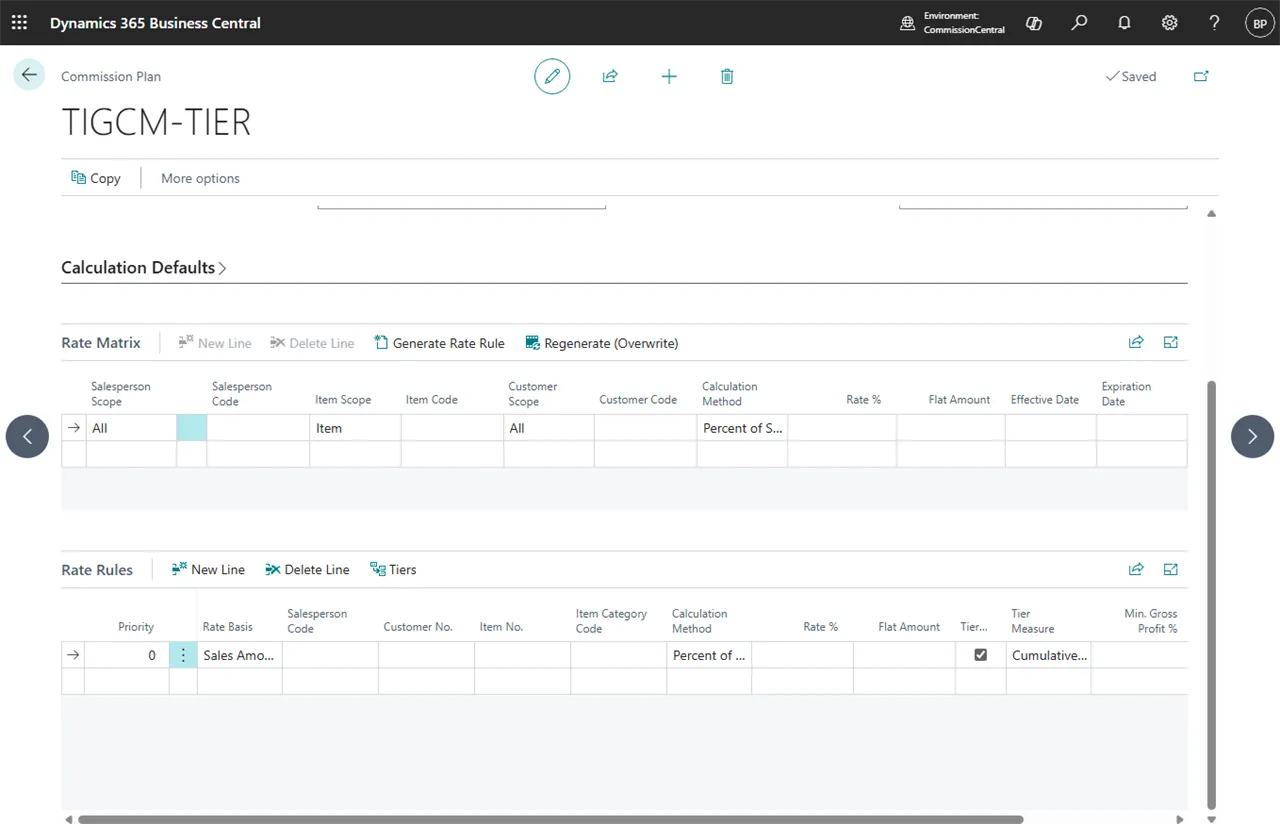 Figure: Commission Plan card.
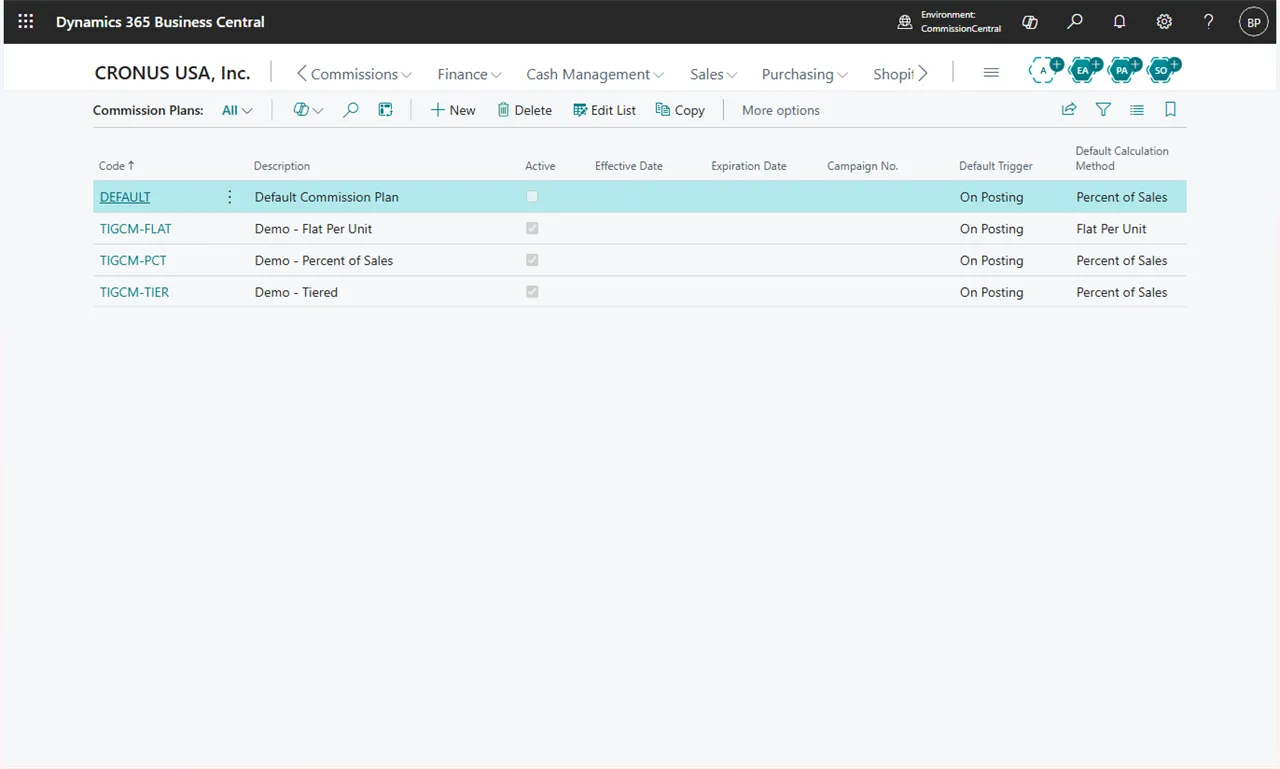 Figure: the Commission Plans list. Copy is on the toolbar.