
Role centers
CommissionCentral has a dedicated Commission Manager role center. It also adds a Commissions navigation group to the standard Business Manager role center. Commission work is therefore reachable from day one, in both profiles.
The CommissionCentral role center
A new Commission Manager profile opens the CommissionCentral role center. The app enables and promotes the profile, so it shows in the role-selection list (My Settings → Role) from the start. Assign it to your commission administrators and managers, or select it yourself in My Settings.
The role center gives a commission manager everything in one place:
Activity cues
A set of at-a-glance tiles (the Commissions and Configuration cue groups). Each tile opens the matching list:
| Cue | What it shows | Opens |
|---|---|---|
| Commission Payable | The net payable amount of all ledger entries ready to pay (status Payable) | Commission ledger entries, filtered to Payable |
| Commission Outstanding | The net payable amount of entries that are Calculated or Pending | Commission ledger entries, filtered to Calculated + Pending |
| Commission Paid This Month | The net payable amount of entries paid in the current month | Commission ledger entries, filtered to Paid |
| Active Plans | The count of active commission plans | Commission Plans |
| Agent Assignments | The count of agent assignments (maintained on the customer card) | Salespeople |
| Open Payment Batches | The count of payment batches not yet released or posted | Payment Batches |
The Commission Paid This Month cue covers month-to-date. The other money cues sum the whole commission ledger by status.
Navigation
- A Commissions section with direct links to Commission Setup, Commission Plans, Commission Networks, Manager Teams, the Commission Journal, Commission Ledger Entries, and Payment Batches. A Reports sub-group holds the Commission Audit and Commission Summary reports.
- Create shortcuts for a new commission plan and a new payment batch.
- Find shortcuts (embedding) for the commission plans, the ledger entries, and the payment-batch lists.
A headline part greets the user and links to the CommissionCentral documentation site.
The Business Manager additions
The standard Business Manager role center gets a Commissions group in the navigation pane. The group holds the same actions as the role center’s Commissions group: Commission Setup, Commission Plans, Commission Networks, Manager Teams, the Commission Journal, Commission Ledger Entries, Payment Batches, and the Commission Audit and Commission Summary reports. The app adds no cues or parts to the Business Manager home page — only the navigation group. The standard layout stays unchanged.
The Sales Manager role center stays unchanged, on purpose.
Permissions
The existing role permission sets grant the cues and pages:
- CommissionCentral - Manager (
TigCM Comm. Manager) and CommissionCentral - Admin/Implementer (TigCM Comm. Admin) both grant execute on the role-center pages, and read/modify on the base Activities Cue table (the role center inserts its single cue row on open). - The cue totals read the commission ledger, the commission plans, the agent assignments, and the payment batches. These roles can already read all of them.
See Permissions & roles for the full role matrix.
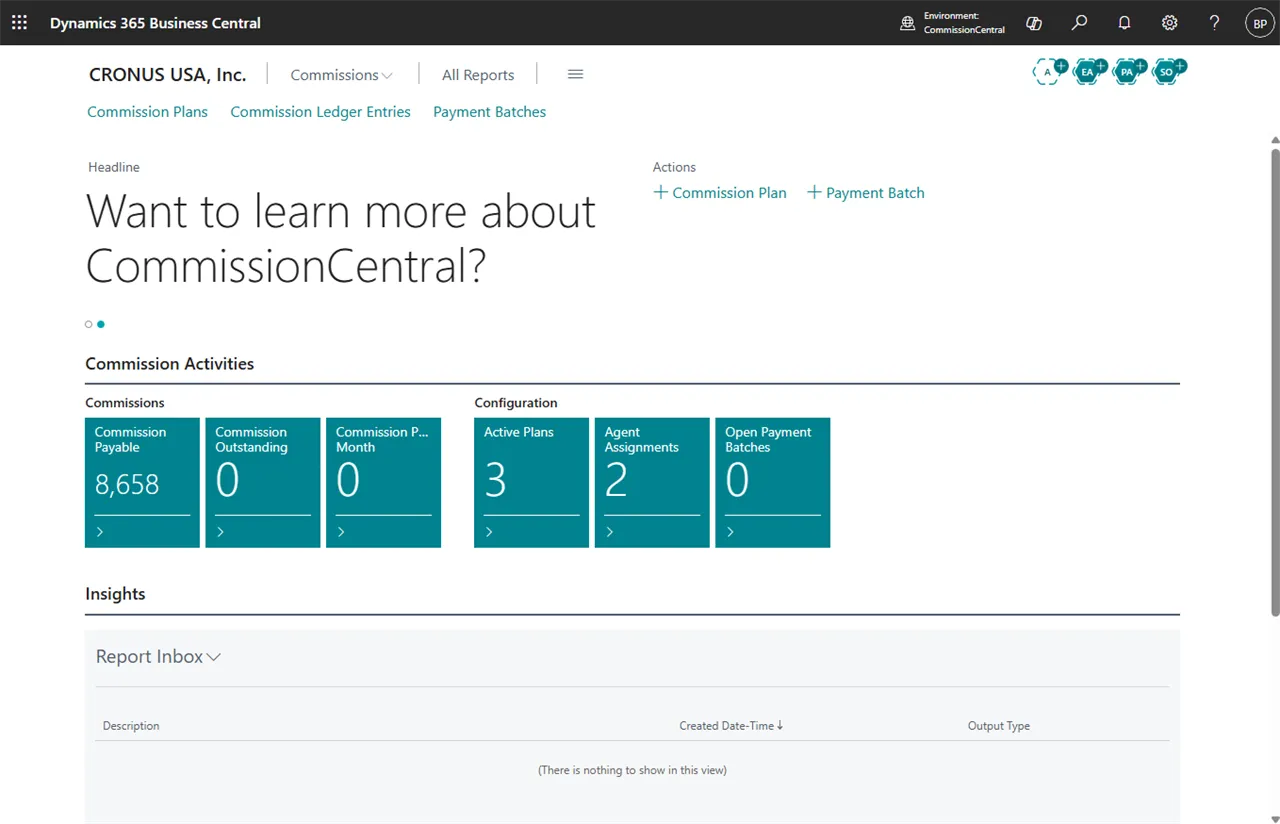 Figure: the CommissionCentral role center. The cues show live figures for the company you are in.