
Payments
Pay the agents in four steps. Gather the Payable commission into a payment batch. Release the batch. Print the test report to find any problem before you post. Then post the batch. Posting settles each entry to Paid and creates the correct output for each agent type: an Accounts Payable invoice for an external vendor, or a payroll general-journal line for an internal employee or manager. Commission reaches the general ledger only at this point.
Open search → Payment Batches.
1 · Create a batch
The COMM-PAY series numbers each batch automatically (for example, CPAY-00001). A new batch
starts in status Open. Set its scope:
| Field | Purpose |
|---|---|
| Period Start / Period End | The posting-date window to pay. |
| Agent Filter | Optional: limit the batch to one agent (blank = all). |
| Posting Date | The date the payment posts. |
2 · Suggest lines
Choose Suggest Lines. The batch gathers the Payable commission entries for its period and agent filter — one line for each entry. The batch includes only Payable entries. It excludes Calculated, Pending, On Hold, Reversed, and already-Paid entries. The batch skips a Payable entry with a net payable of zero, because there is nothing to settle. The batch includes a downward correction with a negative net payable. The correction reduces the batch total. A new run rebuilds the lines.
Each line shows the Commission Ledger Entry No., Salesperson Code, Agent Type, the Payout Method (Accounts Payable or Payroll — derived from the agent), and the Net Payable Amount.
3 · Release
Choose Release to lock the batch (status Released). A released batch cannot get new suggested lines. The batch must have at least one line.
4 · Print the test report
Choose Test Report to review the batch before you post it. The report changes nothing. It posts nothing. Run it from the Payment Batch card, or from the Payment Batches list. The list action prints all the batches that you select.
The report has three parts:
- The batch header. The batch no., status, period, posting date, and the audit stamps. It also shows the Payment Journal Template/Batch and the two posting accounts that Commission Setup holds now. The post uses these values.
- The batch lines. One row for each line. The row shows the commission ledger entry no., the agent, the agent type, the payout method, the source document, and the net payable amount. It also shows the status and the posting date of the entry that the line settles. The report prints a subtotal for each agent, then a grand total and the line count. A negative net payable prints with its minus sign. It reduces the subtotal and the grand total.
- The validation list. Each condition that would stop the post. The report lists these conditions. It does not cause them.
The report finds these conditions:
| Condition | Why the post fails |
|---|---|
| Batch not released | Only a Released batch can post. |
| Batch has no lines | An empty batch has nothing to settle. |
| Ledger entry is not Payable | The entry was held or reversed after the release. Suggest the lines again. |
| Ledger entry is missing | The entry no longer exists. Suggest the lines again. |
| Unsupported payout method | An extension put a payout method on the line that the post cannot route. |
| Commission Setup is missing or incomplete | The report names each empty field. |
| Payment journal not found | Commission Setup points to a journal that does not exist. |
| Posting account not usable | The account is missing, blocked, not a Posting account, or does not allow direct posting. |
| Commission Vendor No. missing | An External Vendor agent has no vendor on the salesperson card. |
| Vendor not usable | The vendor is missing, blocked, privacy blocked, or has no Vendor Posting Group. |
| Purchase Invoice Nos. missing | Purchases & Payables Setup has no number series for the invoice. |
The report also gives two warnings. These do not stop the post:
- The ledger entry is also in another batch. Two batches hold the same entry. The second batch to post fails on that entry.
- The posting date is empty. The post uses the work date.
When the batch has no blocking condition, the report says so.
Use the report on an Open batch too. Batch Not Released is the expected result there. It is not a defect. On a Posted batch, the report prints a record of what the post settled.
What the report does not check. It checks this app’s own posting conditions, and the master data that they use. It does not check the later posting of the payroll journal or the purchase invoice. Those documents have their own posting rules.
5 · Post
Choose Post. For each line, the post:
- Settles the commission entry to Paid and connects it to the batch. The post makes sure the entry is still Payable — an entry that was held or reversed after release stops the post. The post does not overwrite it.
- External Vendor agents → the post creates a purchase invoice (Accounts Payable) for the vendor, one per vendor per batch, with a reference to the batch. The app stamps the line’s A/P Document No.
- Internal Employee / Manager agents → the post stages payroll general-journal lines (debit the Commission Expense account, credit the Commission Accrual account) in the configured Payment Journal Template/Batch. Payroll posts them downstream.
- A line with a negative net payable posts with the opposite sign. The purchase invoice gets a negative line. The payroll journal line credits Commission Expense and debits Commission Accrual.
The post is atomic. If a step fails (a missing vendor, an unconfigured journal, a drifted entry), the whole batch rolls back. The batch becomes Posted, with Posted By / Posted DateTime stamped.
Worked example (UC-10). An external-vendor agent’s Payable entries → a purchase invoice for the vendor; the entries become Paid, with the A/P document referenced.
Draw advances
When Draw Enabled is on, you can pay an agent before they earn. Choose Create Draw Advance on the Payment Batches list. The advance raises the agent’s Draw Balance and records a negative obligation in the commission ledger. The agent’s future commission then nets against the draw. The app applies the cap first, then nets the draw against the capped amount, with a floor at $0. The remainder carries forward.
Worked example (UC-07). Draw balance $1,000, and the agent earns $800 → draw offset $800, net payable $0, and the draw balance falls to $200. (The draw obligation entry itself nets to $0 net payable, so a payment batch does not gather it.)
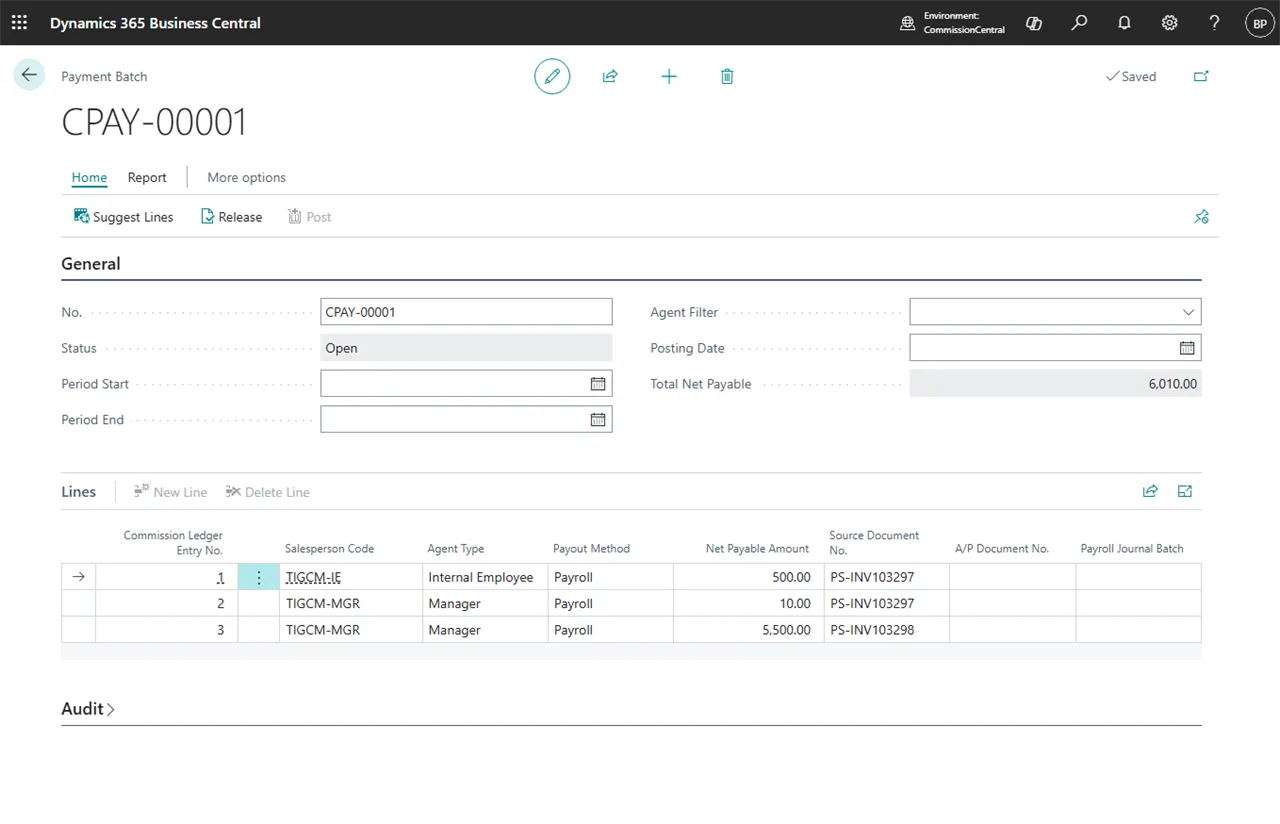 Figure: a payment batch ready to post.