
Ledger & audit
The Commission Ledger is the source of truth for commission entries. Each entry is read-only and carries a full breakdown of its calculation. You act on entries through controlled actions (release, hold, adjust, reverse). These actions keep the trail append-only.
Open search → Commission Ledger Entries for the list, or open the Commission Ledger Entry card.
What an entry records
Each entry stores the amounts: Commission Amount, Cap Deduction, Draw Offset, and Net Payable Amount. It also stores how the app derived the amount: Plan Code / Plan Line No., Calc Method, Rate Pct, Basis Amount, Gross Profit Amount/Pct, Agent Type, the Commission Trigger, and the source document. The Detailed Entries subpage breaks the amount down further — one row per tier segment for a tiered entry — with the rate, basis, and gross profit for each. The stored data explains the commission amount, with no recalculation.
Status lifecycle
| Status | Meaning |
|---|---|
| Calculated | Created by an On-Posting/On-Shipment trigger. Eligible, and waits for promotion to Payable. |
| Pending | Created by an On-Payment trigger. Becomes eligible when the Cash % threshold is met. |
| Payable | Approved for payment. Only Payable entries can go into a payment batch. |
| Paid | Settled by a posted payment batch. |
| On Hold | Temporarily excluded from payment. |
| Reversed | Offset by a reversal (for example, a credit memo). The app flags the original; it does not delete it. |
The Calculated/Pending → Payable step is the approval gate. In Automatic approval mode, the step happens immediately. In Review mode, entries wait for a release.
Actions
| Action | What it does |
|---|---|
| Release | Releases eligible entries (Calculated, or Pending with the Cash % threshold met) to Payable. Records Released By / Released DateTime. The app skips the other entries in the selection. |
| Place On Hold | Holds a Calculated/Pending/Payable entry and excludes it from payment. The app remembers the prior status. |
| Release from Hold | Returns an on-hold entry to its prior status. |
| Adjust Entry | Posts an append-only correction. The action opens the Commission Journal with a delta line prepared from the entry. Enter the amount and a required reason code, then post. The original entry does not change — a separate adjusting entry nets against it. A downward adjustment carries a negative net payable. It reduces the agent’s next payment batch. |
| Show Source Document | Opens the posted source — the sales invoice, credit memo, or shipment (or the customer ledger entry for a payment). Not available for a manual entry. |
Reversals (credit memos)
Post a credit memo against a commissionable invoice. The app then posts an offsetting negative commission entry and flags the original Reversed. The two entries net to zero. The reversal entry carries the negative of the original’s Net Payable Amount. The pair then nets to zero for the period cap, and the cap room comes back. A reversal also proceeds when the original is already Paid. The paid entry stays Paid but gets the flag, and the app logs a warning for manual reconciliation.
Worked example (UC-06). A $500 Calculated entry, then a credit memo → the original becomes Reversed, and a new −$500 entry posts; net $0.
Finding commission entries from a posted document
You can go from a posted source document directly to the commission it produced. Open a posted Sales Invoice, Sales Shipment, or Sales Credit Memo and choose Find entries (the Navigate action). Next to the standard rows (G/L, VAT, item ledger, and more), a Commission Ledger Entries row shows the count of commission entries for that document. Select the row and choose Show. The Commission Ledger Entries list opens, filtered to those entries.
The row shows only for users who can read the commission ledger. Users without that access see no commission counts.
Note. Entries match the document the same way the standard ledgers match — by Source Document No. and Posting Date. A manual adjustment (posted from the Adjust Entry action) posts on the work date. It therefore shows under Find entries for a document that you open on that date, not under the original invoice’s date.
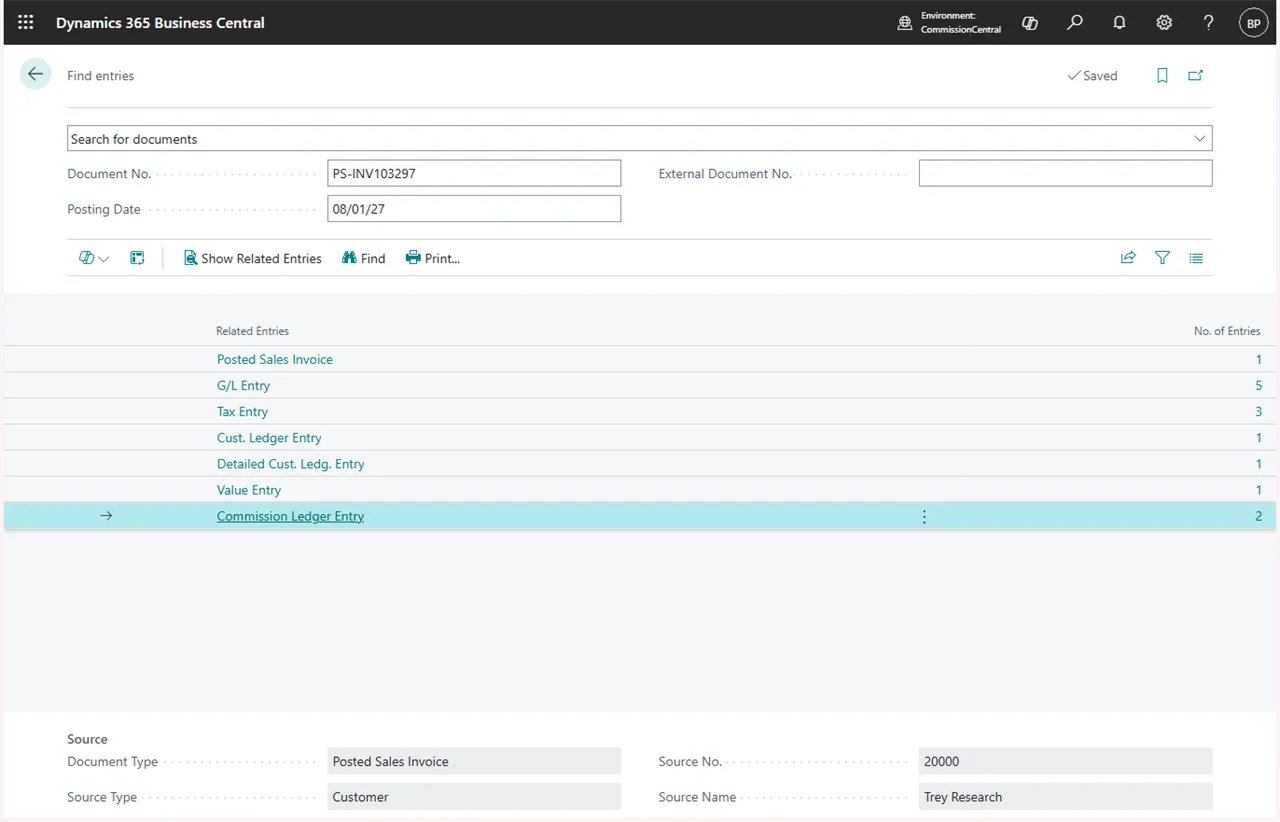 Figure: the Commission Ledger Entries row in Find entries on a posted sales invoice.
Audit report
Run search → Commission Audit for a tabular audit of each ledger entry and its per-tier detail. On the request page, filter by Salesperson Code, Plan Code, Posting Date, and/or Entry No. The report reconstructs and explains each amount from stored data: the matched rule, method, rate, basis, gross profit, per-tier segments, overrides, and reversal cross-references. The report does not recalculate the amounts.
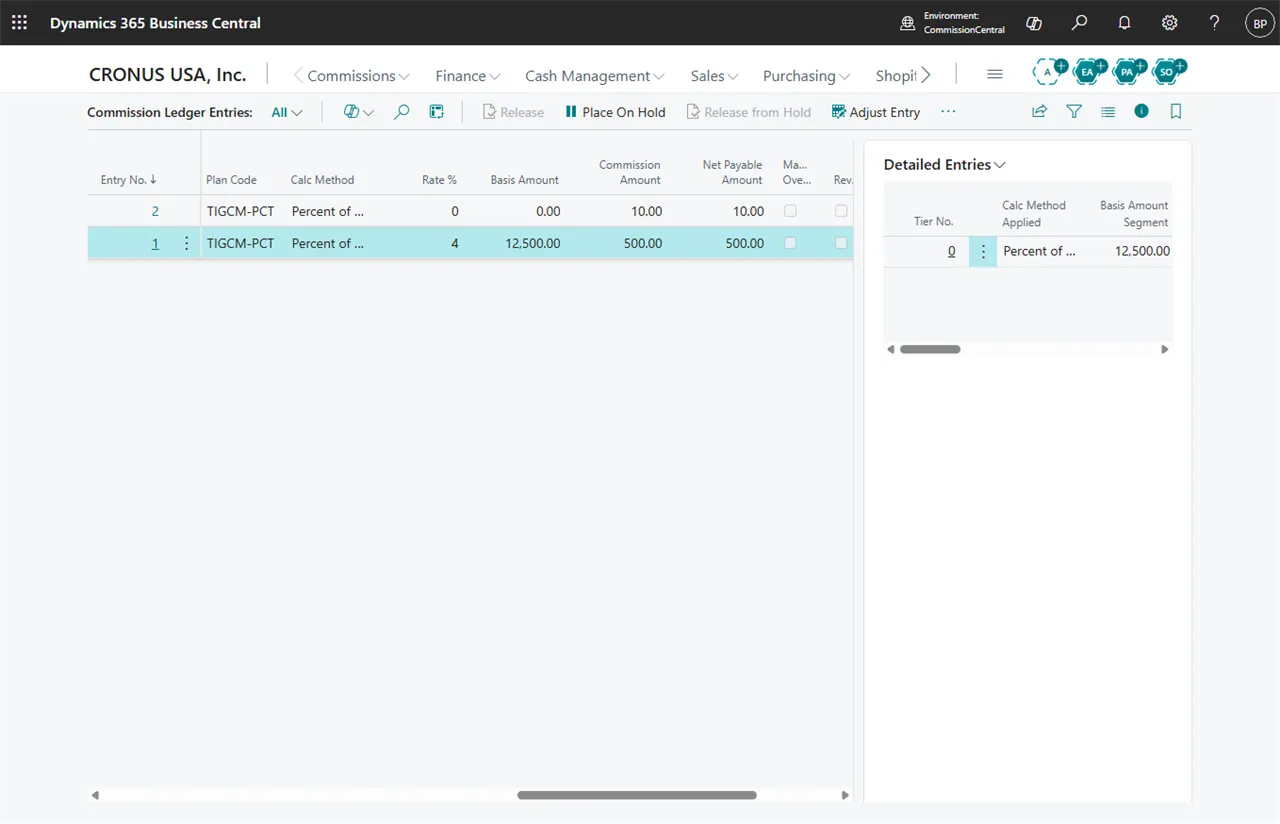 Figure: the Commission Ledger.